Across Australia, more and more older adults are using mobile phones to stay in touch with family, manage appointments, and call for help when they need it. The right device should add connection and confidence, not confusion. Senior-friendly phones put simplicity first, with clear displays, loud speakers, and safety features that are easy to use every day.
In this guide, we’ll cover which features matter most when you’re shopping for a senior-friendly device. We’ll finish with practical setup tips to help you or a loved one get started calmly and confidently.
Why Seniors Need Specially Designed Phones
As we age, small design choices make a big difference. Many older users experience reduced eyesight, hearing changes, arthritis or reduced dexterity, and a natural preference for simple, familiar layouts. Standard smartphones can feel crowded and fiddly due to having lots of tiny icons, swipes, and apps competing for attention.
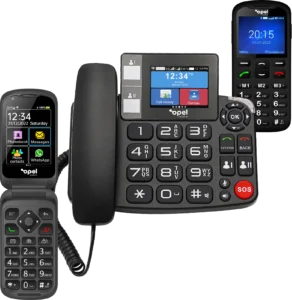
Well-designed senior phones solve these challenges with clarity and comfort built in. Bigger text and high-contrast screens make reading easier. Tactile, well-spaced buttons help users dial accurately without hitting the wrong key. Louder speakers, clearer call quality, and hearing-aid compatibility reduce strain. Plus, with a dedicated SOS button, help is always one press away. The result is easier communication, more independence, and everyday peace of mind for both the user and their family.
Large, Easy-to-Read Displays and Buttons
Readable screens are non-negotiable. A high-contrast display with adjustable font sizes makes it easier to see names, numbers, and messages at a glance. For many seniors, the ability to enlarge text and boost contrast is the difference between reaching for the phone with confidence or avoiding it altogether.
Tactile, raised buttons are just as important. Larger, well-spaced keys reduce accidental presses and make muscle memory possible, which is especially helpful for users with tremors or reduced hand mobility. A dedicated answer/end button, clear call and message icons, and confirm prompts (“Are you sure?”) further reduce frustration. The goal is a stress-free experience where calling, texting, and checking the time feel obvious and intuitive.
What to look for:
- Big, bright screen with adjustable text size and contrast
- Large, clearly labelled keys with good spacing
Simple home screen with only the essentials: Calls, Messages, Contacts, etc.
Loud and Clear Audio
Hearing changes can make everyday calls feel tiring. Muffled speakers, low ringtones, and background noise all add up. Senior-friendly phones address this with powerful, well-tuned speakers and clear audio pathways so voices sound crisp rather than harsh or buzzy. Equally important is the maximum ringtone and speaker volume, so the phone can be heard from another room.
Hearing-aid compatibility is a major plus. Look for phones that support hearing-aid modes (often indicated by M/T ratings), which reduce interference and improve clarity when used with compatible devices. A standard 3.5mm headphone jack or easy Bluetooth pairing gives more options for hands-free calling and private listening.
What to look for:
- Extra-loud ringtones and speaker volume
- Clear voice audio and noise-reduction for calls
- Hearing-aid compatibility and easy headset options
SOS and Emergency Functions
A dedicated SOS feature is one of the most valuable inclusions in a senior-friendly phone. With a single press, the phone can call and/or message pre-saved emergency contacts — often in sequence — so help is reached quickly. Some devices can also include location details in the outgoing message, helping family or carers find the user faster.
The best implementations are simple: an obvious, easy-to-press button (not hidden in a menu), a clear confirmation that help is being contacted, and the ability to customise the contact list. When set up properly, this gives users the confidence to be out and about, knowing support is always close by.
What to look for:
- Dedicated SOS button with single-press activation
- Customisable list of trusted contacts
- Optional location sharing in SOS messages (where available)
Long Battery Life and Simple Charging
For seniors who don’t want to fuss with daily charging (or may occasionally forget) battery life matters. Look for phones that deliver reliable standby time and enough talk time for a full day’s calls and messages. Equally important is the charging experience itself.
Cradle (dock) charging removes the need to line up tiny plugs. You simply place the phone in its stand and it begins charging, which is great for those with reduced dexterity and for creating a habit (e.g., “phone goes in the cradle after dinner”). A visible charging indicator is useful, too. If the device uses a cable, a robust connector (such as USB-C) and clear port markings help.
What to look for:
- Long-lasting battery designed for everyday use
- Charging cradle or easy-to-handle connector
- Clear visual indicators for charging status
Simple Navigation and Clear Menus
Minimal clutter equals maximum confidence. Senior-friendly phones present only the essentials on the home screen and keep menus shallow, no endless scrolling or tiny icons. Big, high-contrast icons and straightforward labels (“Calls,” “Messages,” “Contacts,” “Torch”) make navigation obvious.
Predictable button behaviour also matters: a dedicated back button, a home key that always returns to the main screen, and confirm/cancel prompts that prevent accidental changes. Speed dial and photo contacts can turn common actions into one-press tasks — “Press 1 for daughter,” or “Press the picture to call XYZ.”
What to look for:
- Large icons and plain-English labels
- Clear back/home actions and confirmation prompts
- Speed dial and photo contacts for quick calling
4G Connectivity and Future-Proofing
As older networks are phased out, 4G (and voice over 4G) is the safe choice. A 4G-capable phone with VoLTE support offers clearer, more reliable calls and ensures your device will keep working as carriers continue to modernise their networks. If a user is upgrading from a very old handset, moving to 4G is an important step to avoid service disruptions.
What to look for:
- 4G with VoLTE for clear calls
- Local carrier compatibility and easy SIM setup
Software support for future updates where applicable
Helping Seniors Stay Connected Safely
A thoughtful setup makes all the difference. Start by saving key contacts (family, neighbours, GP, taxi service) and putting the most important ones on speed dial or photo dial. Enlarge text and boost screen contrast. Turn on loud ringtones and set a distinctive message tone. If the phone offers hearing-aid mode, enable it and do a quick test call.
Next, configure the SOS feature. Add trusted contacts, write a clear help message if the phone supports it, and do a practice press together so everyone knows what to expect. If the device includes a torch, camera, or simple tools (calendar, reminders, FM radio), show how to access them from the home screen. Finally, place the charging cradle in a visible, convenient spot, near the favourite chair or on the kitchen bench, so topping up becomes a habit.
If you’re helping a parent or grandparent, keep the first session short and positive. Focus on three actions: answer a call, make a call, send a simple text. Stick a small, printed “cheat sheet” near the phone with the top steps, and plan a follow-up visit to add anything new. The aim is always the same: make technology an ally — supporting safety, connection, and independence without unnecessary complexity.
Ready to find an easy phone that feels good in the hand, sounds clear, and just works? Explore Opel Mobile’s range of senior-friendly phones designed for everyday use by older Australians.